Make Passport Photo with Red Background
Free red background passport photo maker. Replace your photo background with red in seconds.




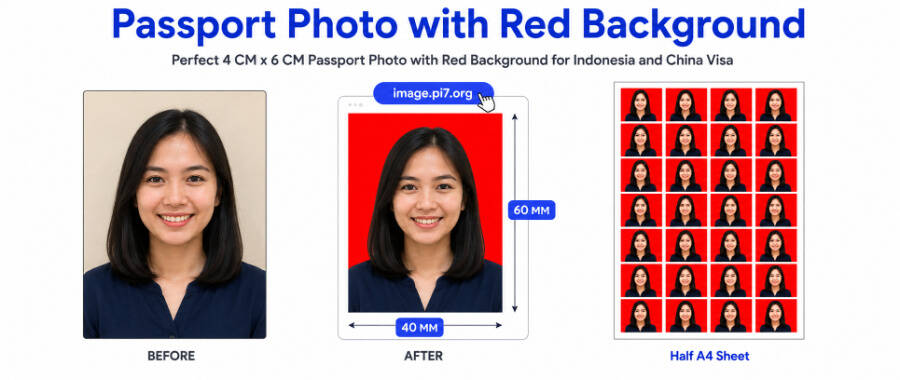
Pi7 Red Background Passport Photo Maker replaces any photo background with red in seconds. Upload your photo. The tool detects the person and fills the background with red. Pick your country preset - Indonesia 3x4, Indonesia 4x6, China visa 33x48mm, India 3.5cm x 4.5cm, or USA 2x2 inch. Download as JPG or PNG. Free to use. Your photo is auto-deleted in 20 minutes.
How to Make a Red Background Passport Photo in 5 Steps
- Upload your photo. Click the upload area or drag your photo in. JPG, PNG, HEIC, and WebP all work.
- Pick your size. Indonesia 3x4, Indonesia 4x6, China visa 33x48mm, India 3.5cm x 4.5cm, USA 2x2 inch, or a custom size in CM, MM, inches, or pixels.
- Crop the face. Drag the corners to focus on the head and shoulders.
- The background turns red. The tool removes the existing background and fills it with red automatically.
- Download. Pick JPG with the red background or PNG with a transparent background. Save the file.
Where Is a Red Background Passport Photo Required?
A red background is the official requirement for several countries and document types. The most common are:
- Indonesia (foto background merah) - KTP, SIM, paspor RI, school ID, and government job applications
- China visa - tourist, student, and work visa applications
- Hong Kong work and study permit photos
- Vietnam visa and student permit forms
- Some Pakistani identity documents
- Older Russian passport renewal photos
- Thai permanent residence for certain categories
Always check the exact requirement of the consulate or government office before you submit. The red shade can vary, with bright red, dark red, and maroon all accepted by different authorities.
Photo Sizes for Indonesia, China Visa, and More
The tool covers the most common red-background passport sizes:
- Indonesia 3x4 (30mm x 40mm) - standard for KTP, school ID, and work permits
- Indonesia 4x6 (40mm x 60mm) - paspor RI and most government job applications
- China visa (33mm x 48mm) - tourist, student, and work visa applications
- India 3.5cm x 4.5cm - many Indian visa applications and forms
- USA 2x2 inch - for the rare cases requiring red background on US documents
Need a different size? Use the Custom option. Set width and height in centimetres, millimetres, inches, or pixels. The tool also lets you set DPI, with 300 being the standard for print quality.
Tips for Foto Background Merah Standards
Indonesian government and school photos have specific red-background rules. A few quick tips:
- The official red is bright red, close to pure red. Avoid maroon or pink unless your office accepts those shades.
- The face should fill 60 to 80 percent of the photo height.
- Hair, ears, and shoulders should all be clearly visible.
- No shadows on the face from harsh side lighting.
- Wear clothing that contrasts with red. Black and navy work best.
- For SIM and KTP, the photo must be straight on with no tilted head.
If your photo has visible shadows after background replacement, the original is too dark. Retake the photo under natural light and try again. If you also need a blue or white version, our Blue Background Passport Photo Maker and White Background Passport Photo Maker use the same workflow with different colours.
Your Photo Stays on Your Device
Pi7 takes your photo privacy seriously.
- Automatic deletion. Your photo is automatically deleted from our servers 20 minutes after processing.
- Manual deletion. You can delete your photo immediately at any time. Just click "delete my image from server" in the download view.
You never need to sign up. You never need to share an email address. Your photo is gone the moment the deletion window closes, or as soon as you click delete.
Frequently Asked Questions
What shade of red should the background be?
Bright red is the most common, close to pure red. Some authorities accept dark red or maroon. Always check your specific consulate or government requirement first.
Will the red background photo work for an Indonesian KTP or paspor?
Yes. The Indonesia 3x4 preset matches the KTP, SIM, and most government ID requirements. The Indonesia 4x6 preset is built for paspor RI and many job applications. The red shade is the standard bright red used by Dukcapil offices.
Can I use the same photo for both China visa and Indonesia paspor?
You can use the same source photo but you need different sizes. China visa is 33mm x 48mm. Indonesia paspor is 4cm x 6cm. Generate each version separately by picking the right preset before download.