Deep Fryer Photo - Free Online Image Deep Fry Tool
Pick an image. Hit a preset. Download your deep-fried meme. Runs in your browser.
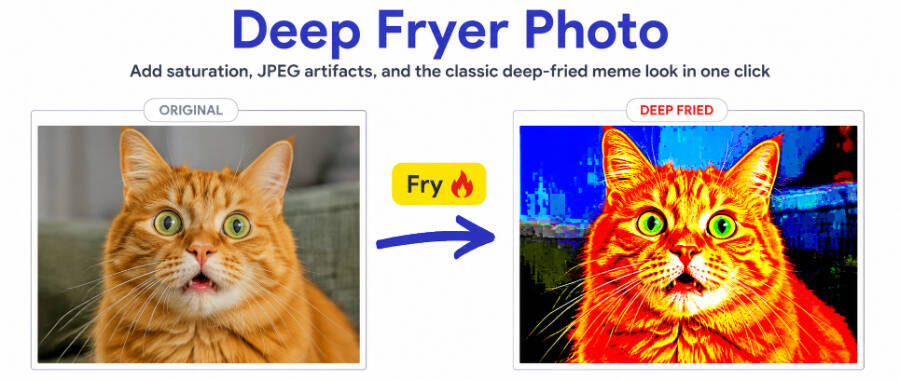
Pi7 Deep Fryer Photo turns any image into a deep-fried meme in seconds. Upload a photo. Pick Mild, Crispy, Burnt, or Nuclear. The tool cranks up the saturation, boosts contrast, adds a warm tint, sprinkles noise, and runs the image through repeated low-quality JPEG compression. Everything happens in your browser. No signup. No upload. No watermark on the download.
How to Deep Fry a Photo in 5 Steps
- Upload your photo. Drop it onto the upload area or click to pick a file. JPG, PNG, WebP, and GIF all work.
- Pick a fry level. Tap one of the four presets or drag the intensity slider for fine control.
- Watch the fry happen. The tool adds saturation, contrast, a warm shift, noise, and JPEG artifacts in about a second.
- Stack more if you want. Hit Fry It Again to layer a small extra pass on the current result.
- Download. Click Download to save the cursed image as a JPG.
The Four Intensity Levels
Each preset is tuned to a different point on the deep-fried scale:
- Mild - a slight amateur-edit vibe. Saturation and contrast lifted a little. Three JPEG passes. Good starting point.
- Crispy - the classic meme look. Vivid colours, visible JPEG blockiness, faint warm cast. Most people stop here.
- Burnt - strong deep-fried territory. Colours clip in bright spots, noise is obvious, compression artifacts everywhere.
- Nuclear - fully cooked. Ten JPEG passes at 10 percent quality. The image is destroyed on purpose.
The custom intensity slider goes from 1 to 150 percent for anything between or beyond the presets. Slide past 100 percent for over-the-top effects that even the Nuclear preset does not reach.
What Makes a Photo Look Deep Fried
The deep-fried look is not one filter. It is four effects stacked in a specific order.
- Saturation boost. Colours push out toward primary red, green, and blue. Skin turns orange. Skies turn cobalt.
- Contrast crush. Highlights blow toward white. Shadows crush toward black. Mid-tones lose detail.
- Warm hue shift. The whole image gets a slight orange tint, like an old photo left in the sun.
- JPEG compression artifacts. The image gets re-saved as a low-quality JPEG multiple times. Each pass adds blocky 8x8 texture, ringing around edges, and colour banding in flat areas.
The Pi7 tool applies these in the order that produces the most authentic look. Colour changes first, then noise, then the JPEG compression loop. If you want to layer more, the Beautify Image tool can add extra sharpening after, or the Blur Image tool can soften the noise if you overdid it.
Which Photos Work Best
Some photos take the fry better than others.
- Bright, high-contrast source photos - reaction faces, memes, cartoons, screenshots from movies.
- Photos with clear subjects and simple backgrounds. The JPEG artifacts show up cleaner on flat areas.
- Existing memes you want to age or ironise. Applying a Mild pass to a fresh meme gives it that recycled forwarded feel.
Photos that fry less well include very dark images (contrast crushes them to solid black), photos with fine detail across the whole frame, and photos with lots of subtle skin tones you want to keep flattering.
Where People Post These Images
- Discord reaction images and server memes
- Reddit and 4chan meme posts
- Twitter and Bluesky ironic replies
- Ironic profile pictures and banners
- WhatsApp forwards for that boomer-forwarded aesthetic
- Fake screenshot memes where the fry sells the "screenshot of a screenshot" look
- Cursed image collections
Your Photo Never Leaves Your Browser
The deep fryer runs entirely on your device. Your photo is loaded straight into a canvas element and every effect happens in JavaScript on your computer. Nothing is uploaded to Pi7 servers. Nothing is stored. Nothing is tracked.
Close the tab and the image is gone from memory. Refresh the page and you start fresh. No signup. No email. No cookies watching what you fried. This matters if the photo is a private meme, a friend's face, or anything else you would not want on a server.
Frequently Asked Questions
Is my photo uploaded anywhere?
No. The deep fryer runs entirely in your browser. Your photo is never sent to a server. Close the tab and the image is gone.
What makes a photo look deep fried?
Four things stacked together - high saturation, boosted contrast, a warm hue shift, and repeated low-quality JPEG re-encoding. The JPEG artifacts create the blocky compression texture that defines the look.
Can I fry the same photo more than once?
Yes. Click Fry It Again to add a small extra pass on top of the current result. Four or five clicks stacks into peak deep-fried territory.